Skimle feature overview
Skimle is an AI-native qualitative data analysis software for market researchers, customer insights experts, academic researchers, consultants and other curious professionals who want to dig deeper into their data.
Upload interview transcripts, focus group recordings, tables with thousands of open-text responses, documents or any other qualitative data in over 100 supported languages. Skimle's rigorous bottom-up workflow identifies insights and creates a transparent category structure you can freely edit. You can visualise the data with mixed methods, discover patterns using metadata, connect your AI agent to your data using MCP, create compelling presentations and more.
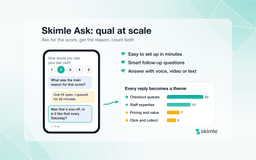
Our platform also includes Skimle Ask, a powerful AI-assisted survey engine for collecting rich qual-at-scale insights. Define your interview guide, share the link with respondents and collect data with text, voice or video responses and smart follow-up questions.
Skimle combines academic rigour with business practicality. Many AI tools skip the actual analysis and just produce a plausible but indefensible summary prone to bias and hallucinations. Legacy tools like NVivo, MAXQDA or ATLAS.ti force you to spend the majority of your time manually coding, not actually analysing. Skimle is built differently: you get a rigorous automated AI workflow for analysis with full two-way transparency and user control.
Skimle is a full-service qualitative analysis platform
Skimle is a versatile tool, allowing you to…
An animated diagram of how Skimle works. Data enters through four input pipes: transcription, document upload, dataset import and Skimle Ask interviews. It passes an anonymisation valve into the machine, where insights are sorted into themes, explored with visualisations, compared across metadata and discussed with an AI research assistant. Results leave through three export pipes: presentations, API and MCP connectors, and data exports.
Academic research
Literature review
Import papers and secondary sources, auto-code themes across hundreds of documents, and identify gaps and patterns in the literature in hours rather than weeks.
Read more →Thematic analysis
Skimle's AI identifies recurring themes across interview transcripts, building a category tree you can review, edit, and validate — with every theme traceable to specific quotes.
Read more →Grounded theory
Build theory inductively from raw data. Skimle codes your transcripts, surfaces emerging concepts, and lets you iteratively refine your codebook as patterns develop.
Read more →Inductive coding
Start with open coding and let Skimle propose categories directly from your data. Review, merge, and rename codes to match your analytical lens, keeping full control throughout.
Read more →Deductive coding
Apply a predefined codebook to your corpus. Skimle matches your categories against new data with full transparency into which quotes triggered each code.
Read more →Mixed methods
Combine quantitative metadata with qualitative themes. Cross-tabulate coding categories against respondent demographics to surface statistically meaningful patterns.
Read more →
Market research & customer insights
Qualitative market research
Run and analyse in-depth interviews, focus groups, and open-text responses in one place: the full qualitative market research workflow, from transcript to quote-backed themes.
Read more →Focus group studies
Transcribe and analyse focus group discussions, tracking who said what and how themes vary across participant groups, moderators, and sessions.
Read more →Customer interviews
Code depth interviews systematically, identify saturation across your programme, and export clean, quote-backed reports for client presentations.
Read more →Voice of the market
Aggregate and code open-ended survey responses from large samples to understand market perceptions, unmet needs, and emerging trends across segments.
Read more →Focus interviews
Conduct structured in-depth interviews using Skimle Ask, then auto-code responses and compare findings across respondent segments instantly.
Read more →
Consulting and due diligence
Expert call synthesis
Transcribe and code expert network calls across a project. Build a structured view of expert perspectives on market dynamics, risks, and opportunities in a fraction of the time.
Read more →Stakeholder input analysis
Analyse stakeholder interviews and workshop outputs systematically, ensuring all voices are represented and traceable in your final recommendations.
Read more →Document summarisation
Extract key themes and positions from large document sets — regulatory filings, company reports, research papers — in a fraction of the time.
Read more →AI data analysis
Use Skimle's AI to rapidly code and categorise qualitative data from interviews, surveys, and documents, freeing consultants to focus on synthesis and insight generation.
Read more →Desktop research
Organise and analyse secondary research sources, auto-coding themes and tracking exactly where each insight originates across your document set.
Read more →
Curious professionals
Company brain
Build a searchable, coded repository of company knowledge: meeting notes, strategy documents, and research that your team can query, analyse, and build on over time.
Read more →AI data analysis
Upload any unstructured data — emails, reports, notes — and let Skimle structure and code it, turning scattered raw material into organised, searchable intelligence.
Read more →Document analysis
Analyse contracts, policy documents, or research papers to extract key themes and insights without reading every word, with quotes traceable to the original source.
Read more →One-off analysis
Run a quick structured analysis on any dataset — interview notes, customer emails, feedback — without committing to a long research programme or learning a complex tool.
Read more →Synthesis of datasets
Combine insights from multiple data sources into a unified codebook, identifying common themes and divergences across datasets from different contexts.
Read more →
Product management
Customer feedback analysis
Aggregate app reviews, support tickets, and survey responses into structured themes. Identify top pain points and feature requests instantly across any volume of data.
Read more →Continuous discovery
Run lightweight interview cycles and code findings into a persistent insight repository. Track how themes evolve across product iterations and team quarters.
Read more →User research
Transcribe and analyse usability sessions, depth interviews, and diary studies. Surface insights faster without losing the richness of qualitative detail your team needs.
Read more →Call log analysis
Upload sales or support call recordings, auto-transcribe, and code at scale to identify recurring objections, feature requests, and sentiment patterns.
Read more →
HR, people and culture
Exit interview analysis
Code exit interview responses at scale to identify retention risks, management patterns, and systemic problems before they compound across your workforce.
Read more →Employee engagement surveys
Turn open-text survey responses into structured themes. Understand what drives engagement and dissatisfaction across teams, locations, and tenure groups.
Read more →Pulse surveys
Run frequent short interviews with Skimle Ask and track how employee sentiment themes evolve over time, giving HR a real-time view of workforce health.
Read more →Culture surveys
Analyse qualitative culture assessment data to identify gaps between stated and lived values, with full traceability to specific respondent quotes for leadership reporting.
Read more →
Public sector and policy analysis
Public consultation analysis
Analyse public consultation responses at scale, coding submissions and identifying the most common positions, concerns, and recommendations across thousands of inputs.
Read more →Policy document review
Extract key themes and positions from policy documents, regulatory filings, and legislative texts — with every finding traceable to the source passage.
Read more →Stakeholder feedback
Systematically code and analyse structured feedback from citizens, service users, or partners — ensuring all voices are captured and represented in reporting.
Read more →Programme evaluation
Analyse interview and survey data from programme participants to assess impact, surface recurring themes, and generate evidence-backed evaluation reports.
Read more →
Connect with MCP
Use Skimle from Claude
Connect Skimle to Claude via MCP and query your research data, categories, and insights in natural language — without switching context.
Read more →Build AI workflows
Use the Skimle MCP server to integrate your qualitative research data into any MCP-compatible AI tool — automating analysis steps and piping results into wider workflows.
Read more →Query research by API
Access Skimle data programmatically via the API. Retrieve projects, documents, categories, and insights to power custom dashboards or external reporting tools.
Read more →
Themes emerge from the data
Every change is logged and can be undone.
Step 1
Upload and collect data
Bring in recordings, documents and datasets, or collect new data with AI-assisted interviews, and anonymise it before analysis.
Transcribe audio and video
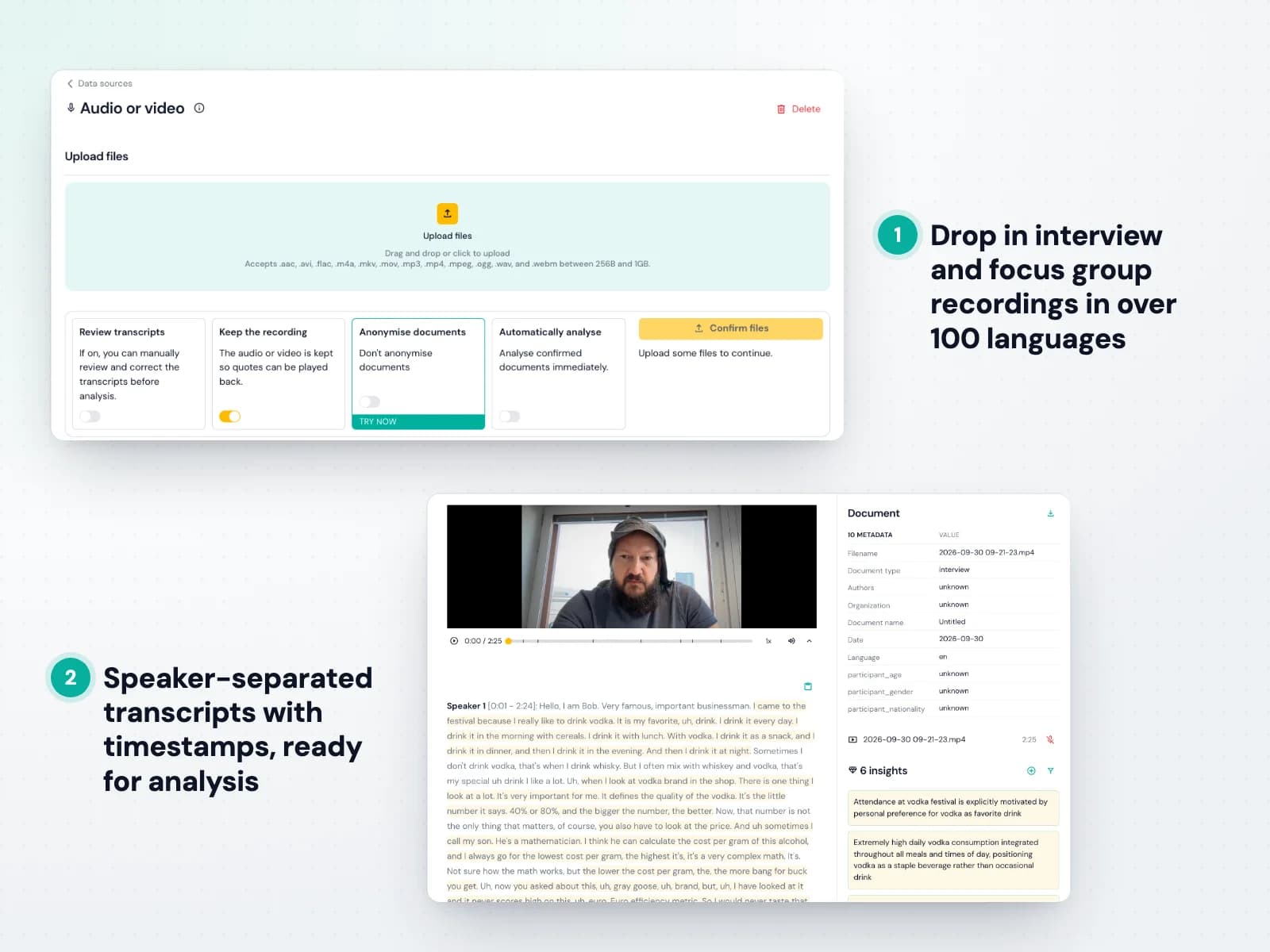
Upload audio or video and Skimle turns it into accurate, multi-speaker transcripts in over 100 languages. There is no separate transcription tool to pay for and no files to shuffle between systems: the text flows straight into your project. See how to upload recordings.
For each data source you choose whether to review transcripts before analysis, whether each recording is kept for playback or deleted by the time its transcript is ready, and whether to anonymise the text before anything else happens.
- MP3, M4A, WAV, MP4, MOV and other common formats
- Speaker separation and timestamps
- Optional manual review before analysis


Upload documents
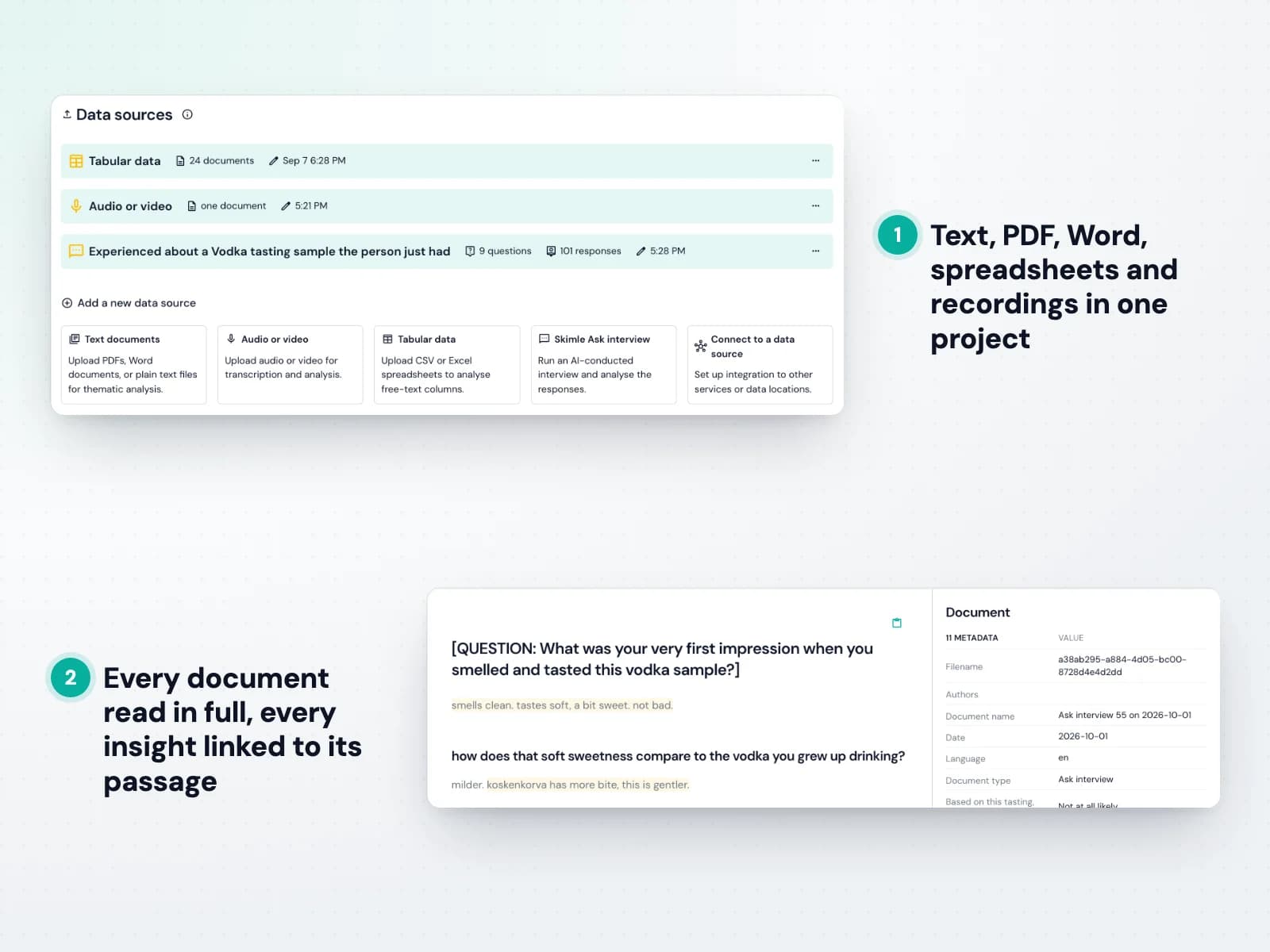
Bring in interview transcripts, reports, articles, notes and open-ended answers in the formats you already use, and mix languages freely within one project. See the supported formats.
Skimle reads every document in full and keeps a link from each insight to the exact passage it came from, so nothing is lost and everything can be checked.
- PDF, Word (DOCX), RTF and TXT
- Over 100 languages, mixed in one project
- Every insight linked to its source passage



Import datasets

Import spreadsheets and survey exports in one go. Each row becomes a document, and for every column you decide whether it is content, metadata or ignored. See how to import and add metadata.
Because the metadata travels with every response, you can later compare what different groups of respondents said, for example new versus loyal customers, or one region against another.
- Excel and CSV import
- Choose content and metadata columns
- Thousands of responses per project



Interview with Skimle Ask
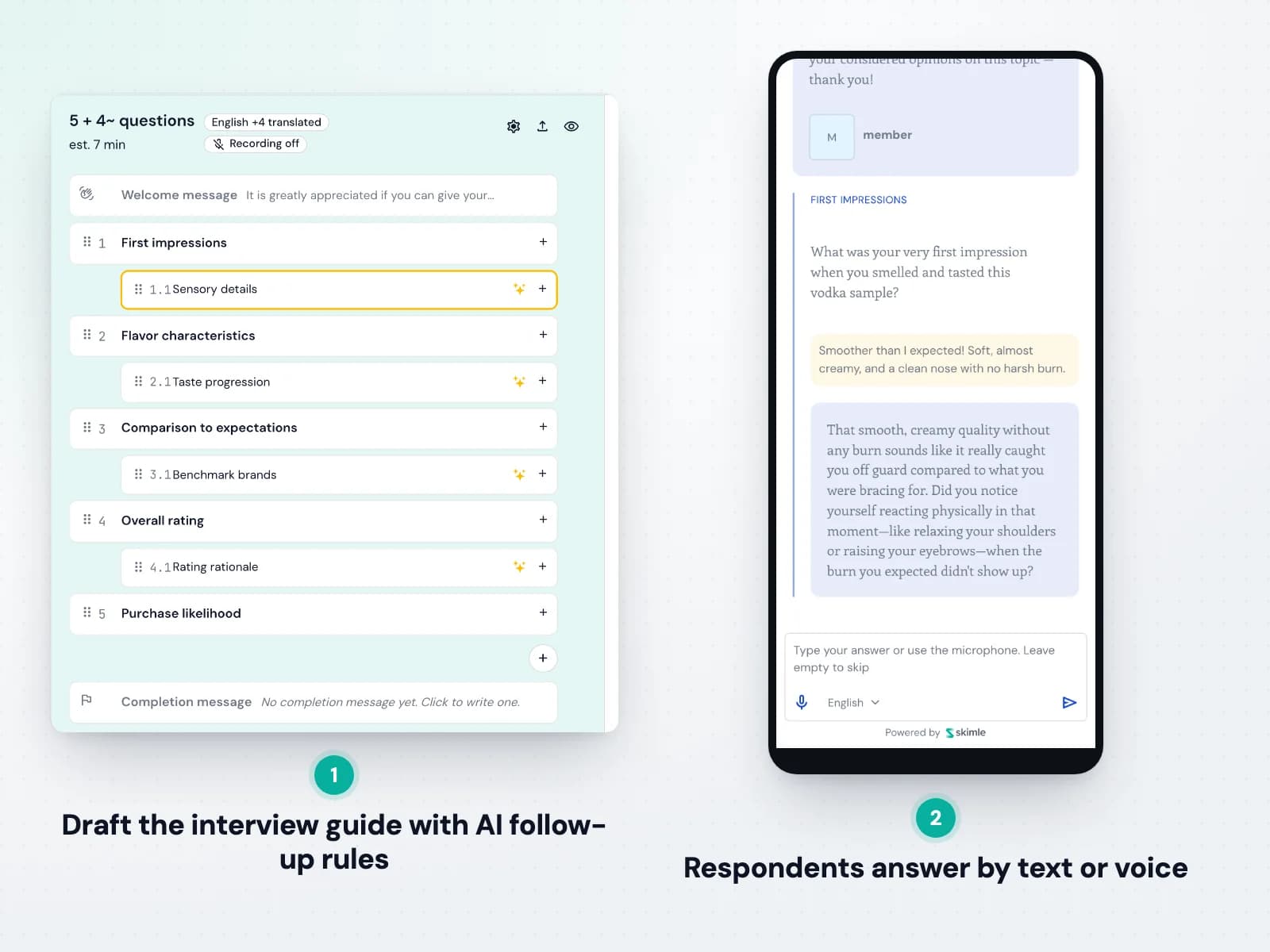
Skimle Ask conducts qualitative interviews at the scale of a survey. Describe what you want to learn, let AI draft the interview guide, and fine-tune each question and its follow-up instructions. See how to create an Ask interview.
Respondents open a link, answer by text or voice, and the AI interviewer probes for detail like a skilled researcher. Completed interviews flow straight into analysis alongside your other data.
- Open-ended and multiple-choice questions
- AI follow-ups with a depth you control
- Interviews in several languages


Anonymise
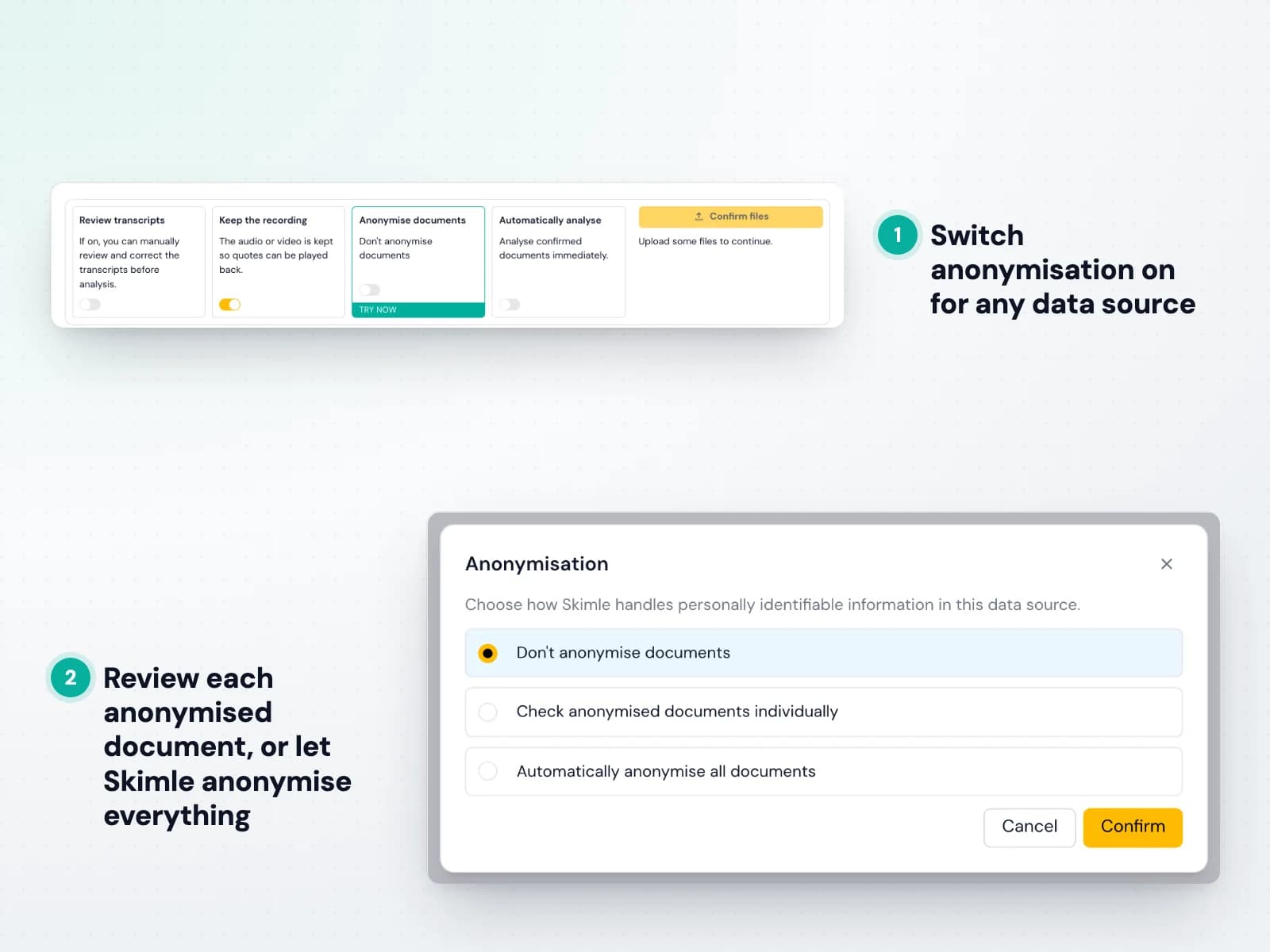
Skimle Anonymise detects personal identifiers across six categories and replaces them before your data is analysed. Switch it on per data source and choose whether to check each document or anonymise everything automatically. See how anonymisation works.
The same person gets the same pseudonym across all your documents, so the analysis still holds together, and respondents can speak freely knowing they cannot be identified.
- Names, roles, locations, organisations, dates and other identifiers
- Consistent pseudonyms across all documents
- Audit report and translation table for ethics boards

Introducing Skimle Anonymise: rigorous pseudonymisation for qualitative data

Anonymisation tools for qualitative research in 2026: De-ID, Textwash, Presidio, MAXQDA and Skimle compared

How to anonymise and pseudonymise qualitative research data: IRB-compliant de-identification of interview transcripts
Step 2
Analyse and explore your data
A rigorous analysis engine with full transparency and control, mixed-method views, metadata comparisons and an AI research assistant.
Rigorous analysis in the core
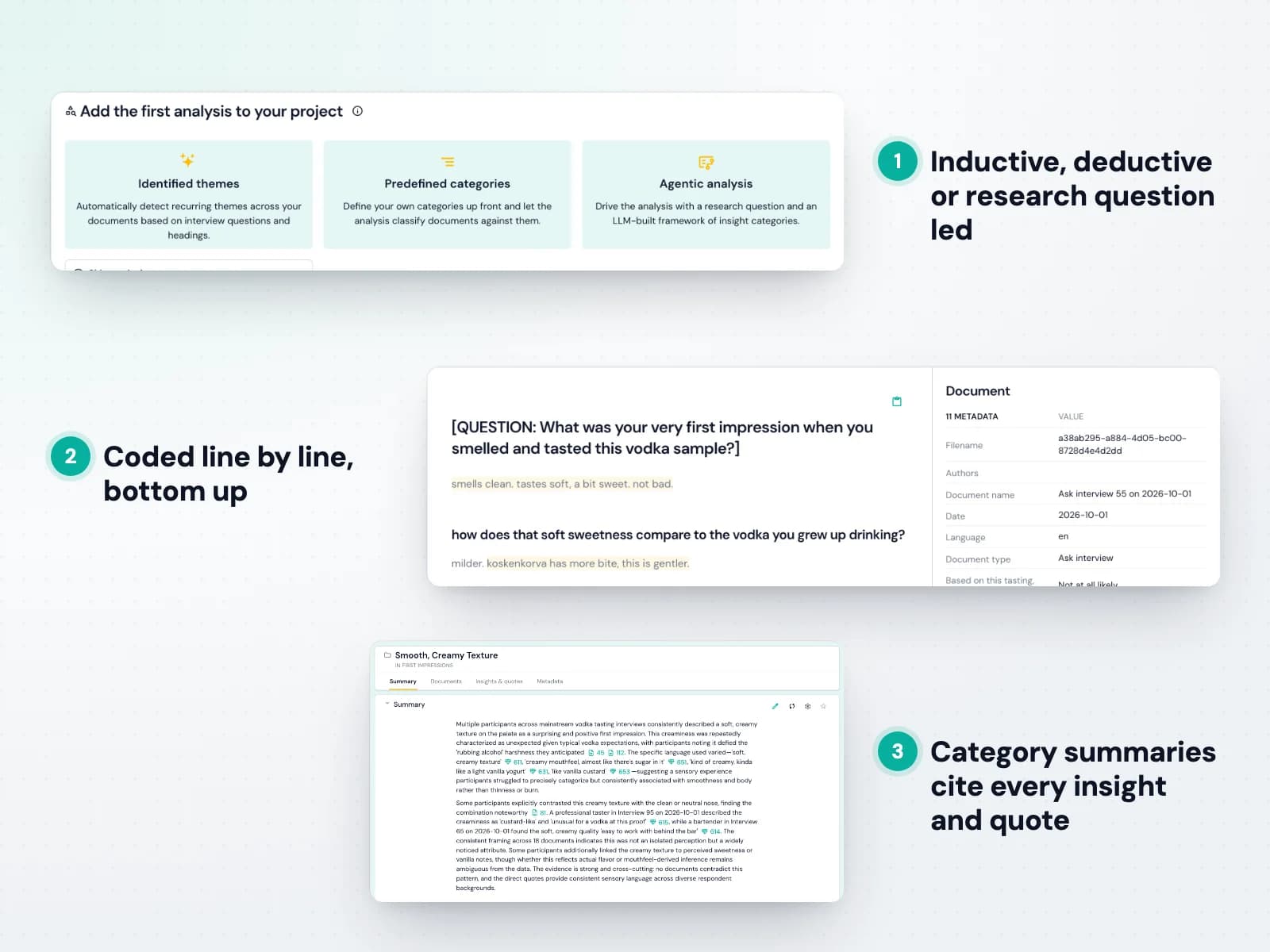
Skimle follows established qualitative methods rather than summarising. It reads every document in full, identifies insights bottom up and organises them into categories, each linked to its source quote. See how the analysis works.
Choose identified themes to let the structure emerge from the data, predefined categories to code against your own codebook, or an agentic analysis that is driven by your research question. Category summaries then cite every insight and quote they rest on.
- Inductive, deductive and research question led analysis
- Every insight linked to a verbatim quote
- Summaries that cite their evidence



Full user control and transparency
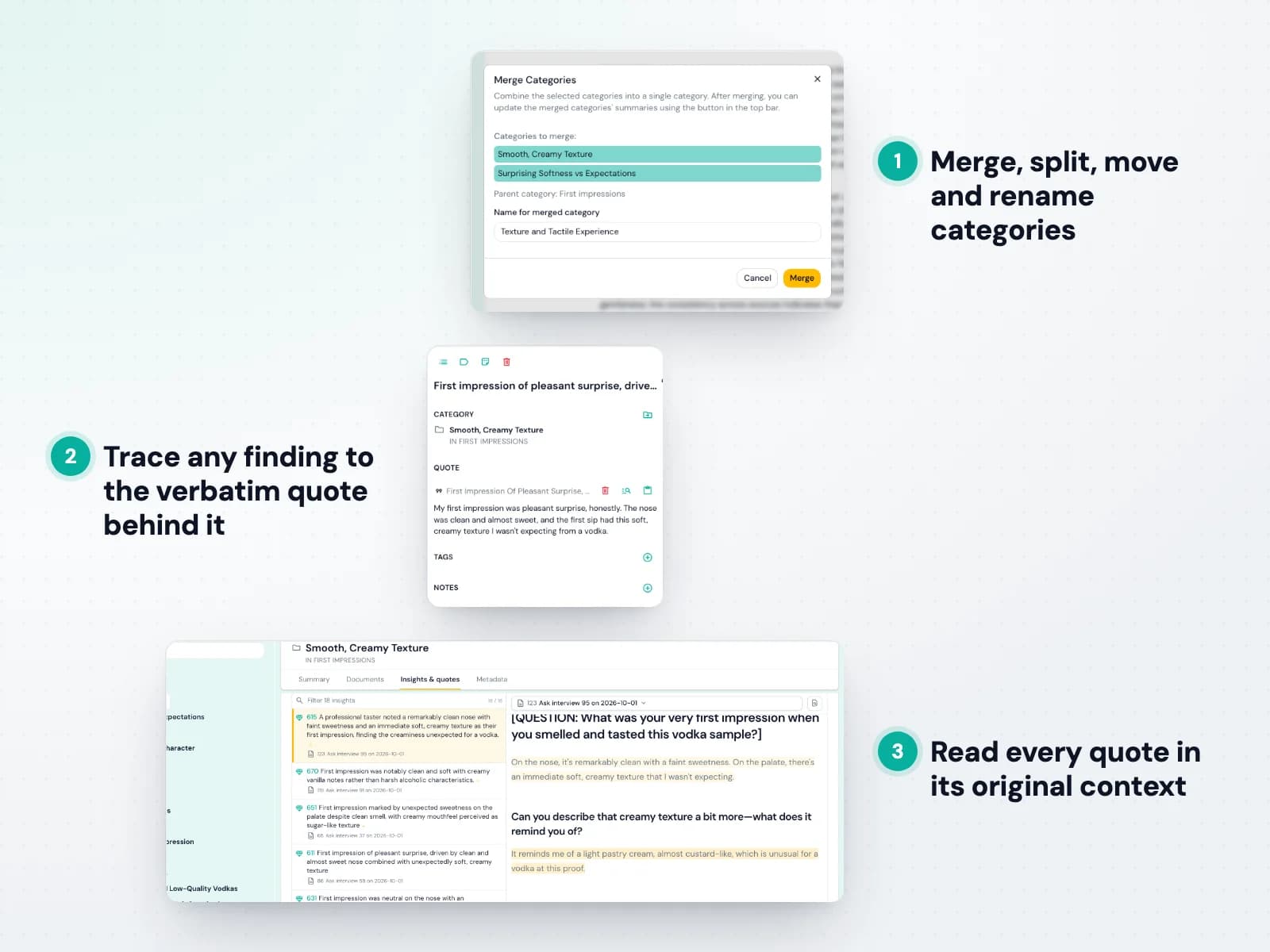
Skimle's two-way transparency means you can always check its work. Click any citation in a summary to see the insight and verbatim quote behind it, and open the document to see exactly what was coded and what was not. See how to manage categories.
When the structure does not match your thinking, change it: merge categories that overlap, split those that are too broad, rename them in your own words and move insights between them. Every change can be undone.
- Merge, split, move and rename categories
- Trace findings to source, and sources to findings
- Undo any change



Use mixed methods and visualise data
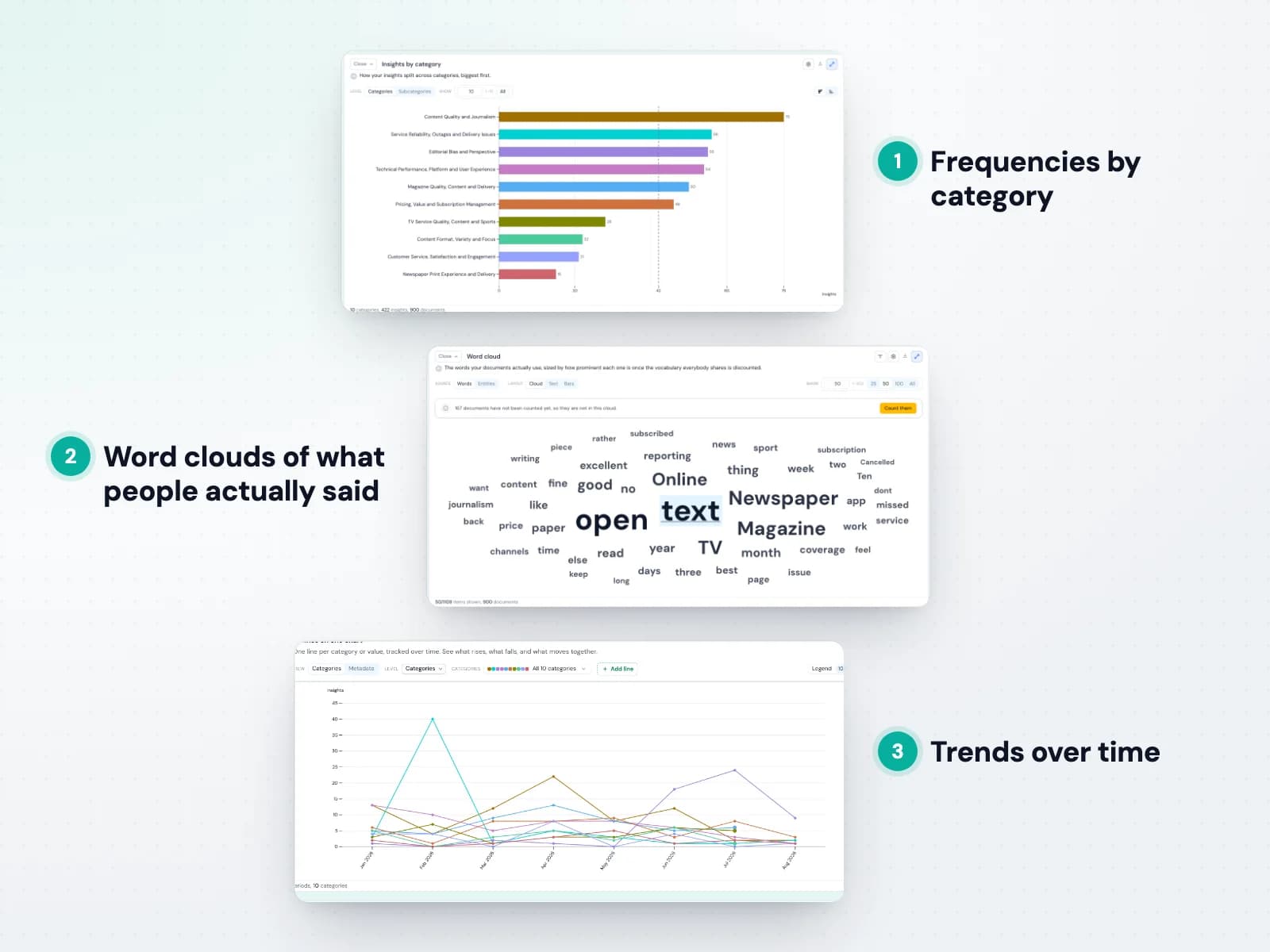
Your coded data becomes numbers you can trust, because every count rests on verified insights. Explore frequencies by category, word clouds, heatmaps across documents and trends over time. See the statistics view.
The views update as you refine the structure, and every bar or point leads back to the insights and quotes behind it, so the numbers and the stories always match.
- Frequencies, word clouds and heatmaps
- Trends over time
- Every number traceable to its quotes



Discover patterns with metadata
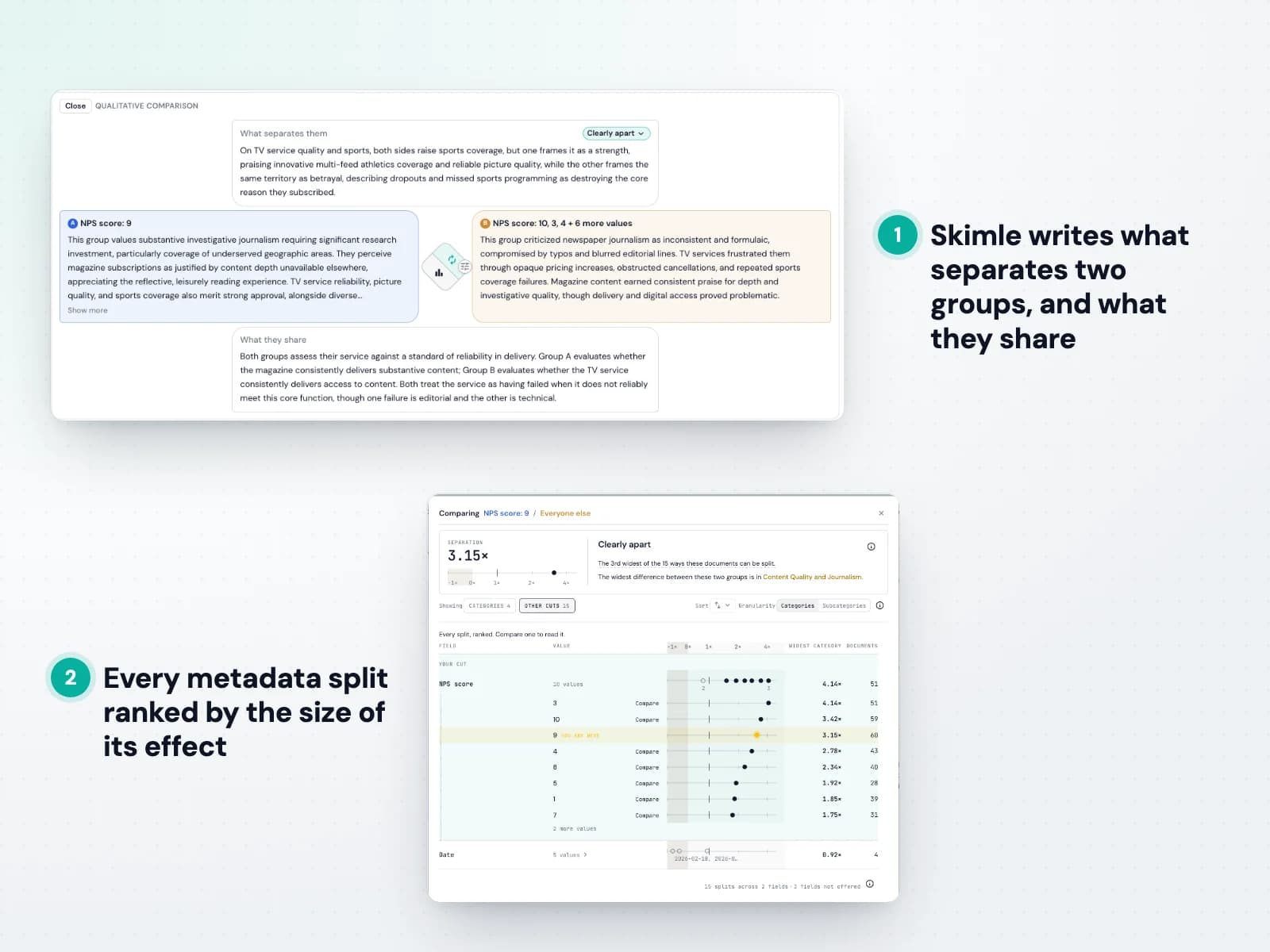
Compare any two groups of documents by their metadata and Skimle shows which categories each group raises more than the other. It then writes what separates the groups and what they share, with citations. See how to analyse metadata.
Not sure which split matters? Skimle ranks every metadata split by how far apart it pushes the groups, so you find the differences worth reporting instead of testing them one by one.
- Group comparisons with written summaries
- Every split ranked by effect size
- Metadata from your data or inferred by AI


Agentic chat as your research assistant
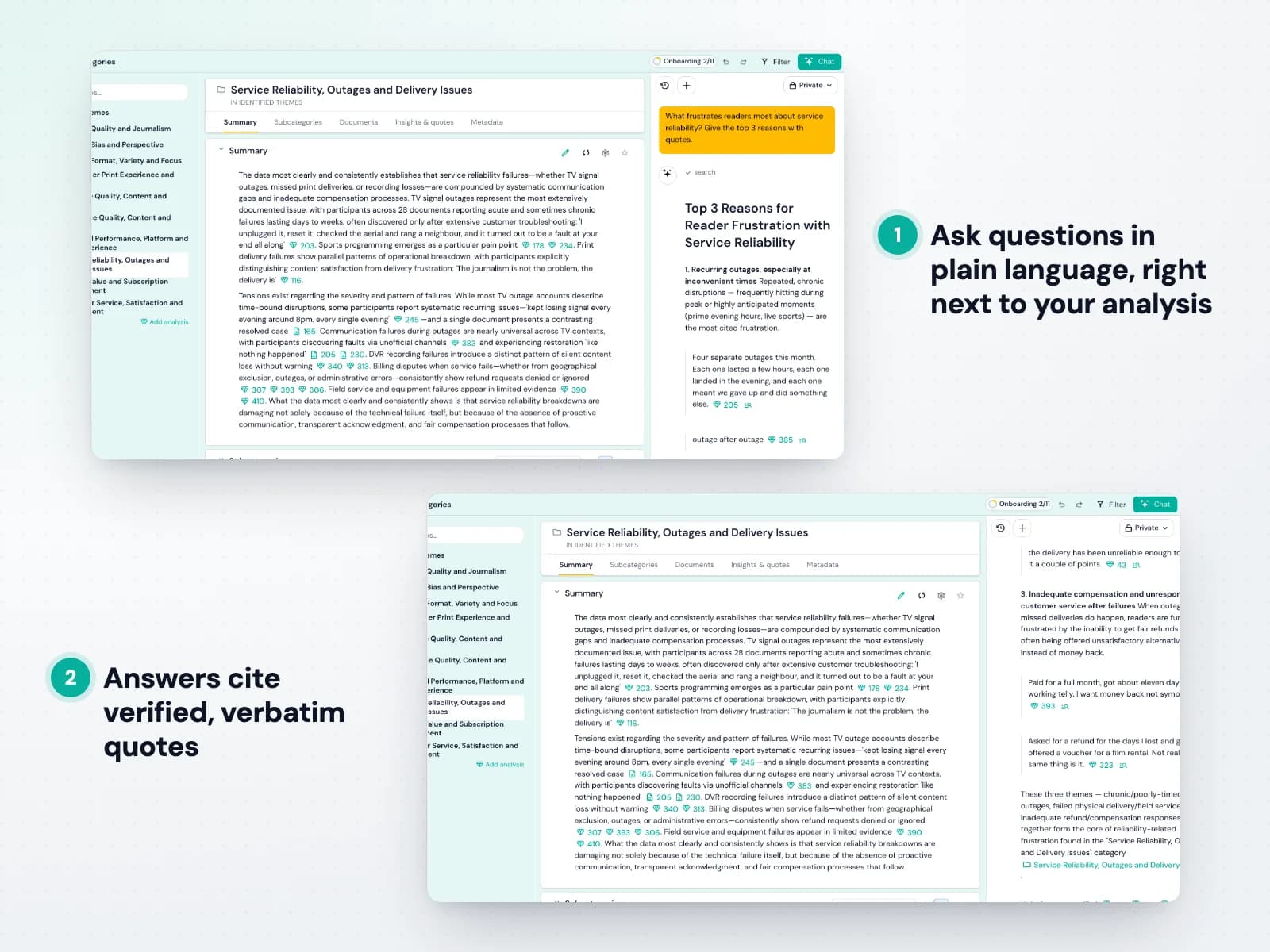
The research assistant works on top of your structured analysis rather than raw documents. Ask questions in plain language and it searches your coded insights, reasons in steps you can follow and answers with verified, verbatim quotes. See how to use AI chat.
It can also act on the analysis: create insights, reorganise categories and add notes, all through the same commands you use yourself, so every change stays visible and reversible.
- Answers grounded in verified quotes
- Searches every coded insight
- Can reorganise and annotate the analysis



Step 3
Export and integrate
Share findings as presentations and reports, export to the tools you use, and connect your own systems and AI agents.
Compelling presentations
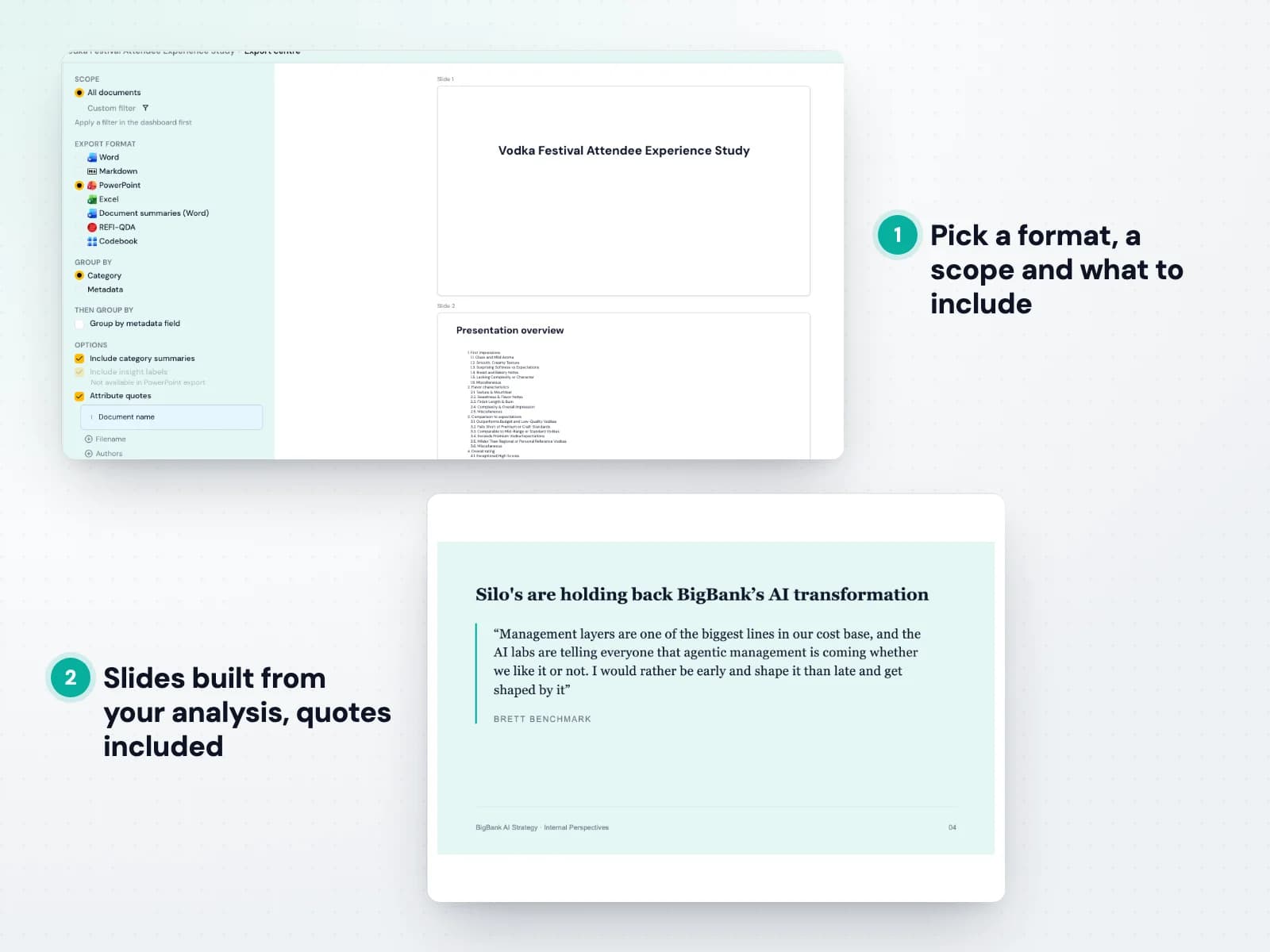
Export your analysis as a PowerPoint deck or a Word report. Pick the scope, group the findings by category or metadata, and choose whether to include summaries, citations and attributed quotes. See how to export to Office.
The result is a ready starting point for your report or presentation: themes, evidence and quotes already in place, each one traceable back to the analysis.
- PowerPoint decks and Word reports
- Summaries, citations and attributed quotes
- Scope and grouping you choose



API and MCP connectors
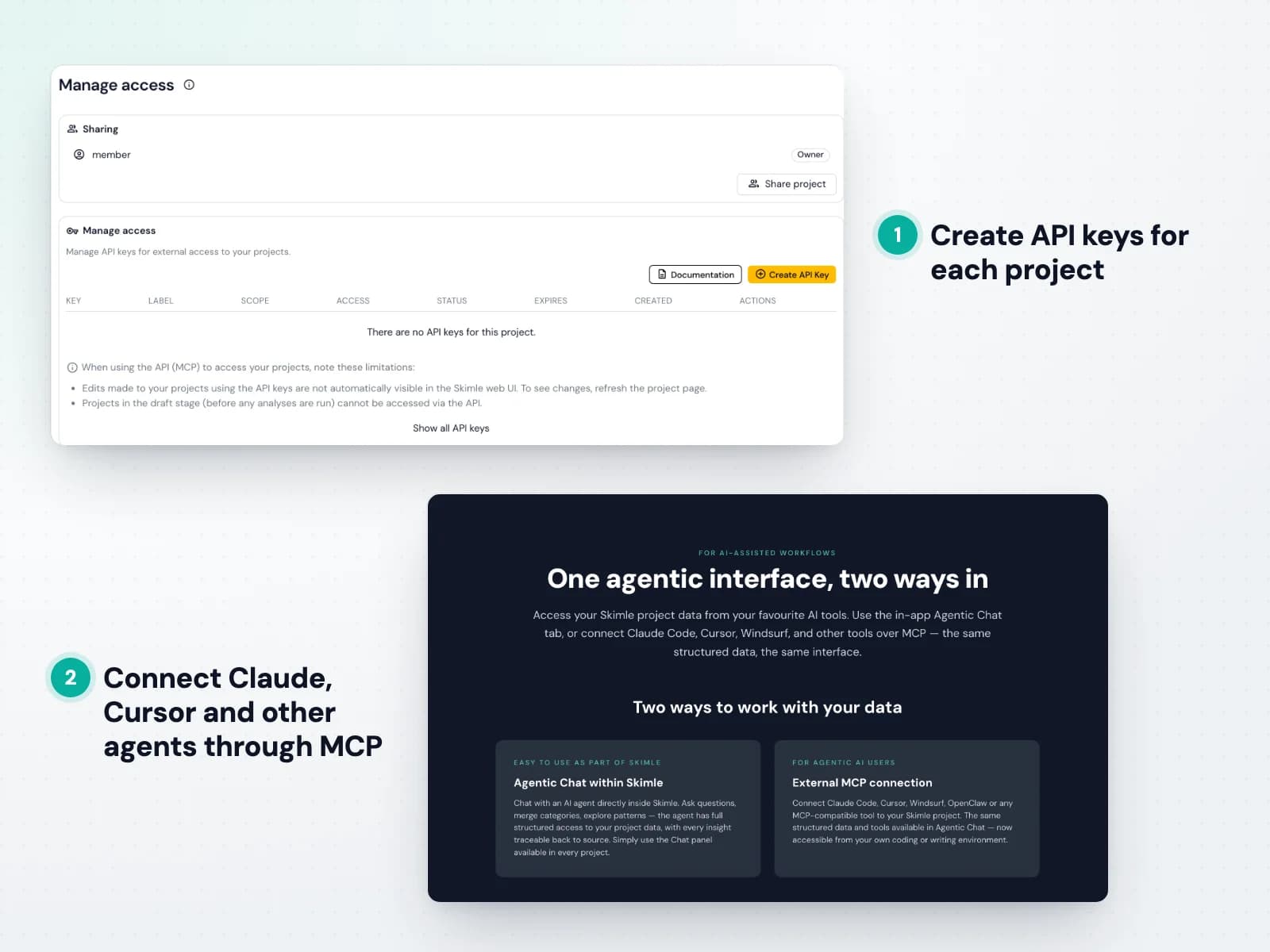
Skimle's MCP server lets Claude, Cursor, Windsurf and other compatible agents work with your structured project data, with the same tools the in-app agent uses. Read more about connecting with MCP.
The REST API lets your own systems read and write project data or run a project end to end. Create API keys per project, with read or edit access, from the project's access settings.
- MCP for Claude, Cursor and other agents
- REST API for reading and writing project data
- API keys per project



Data exports
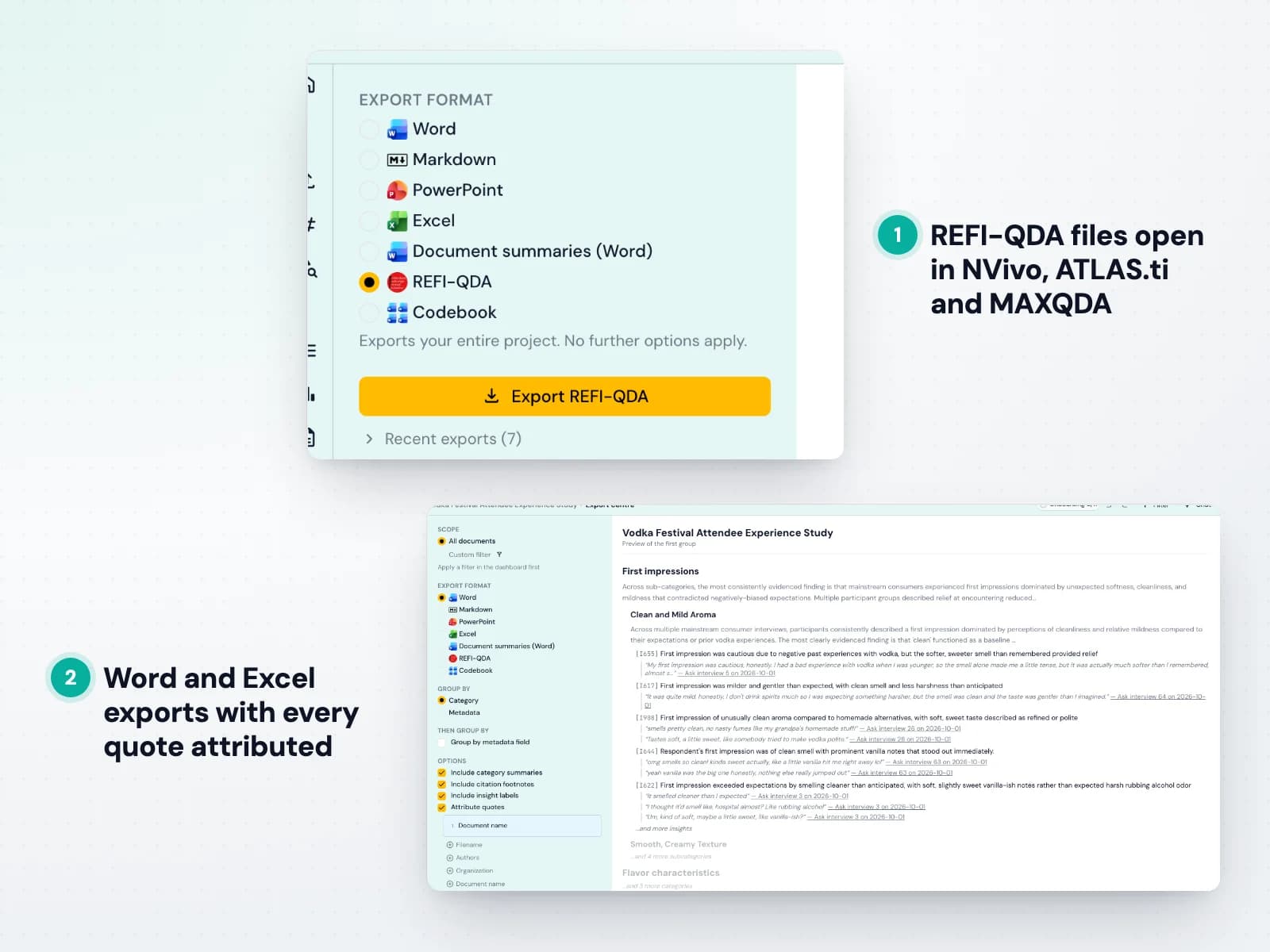
Take your analysis wherever you need it: Excel for the full Skimle table, Word with coding shown as comments, and the open REFI-QDA format for NVivo, ATLAS.ti and MAXQDA. See how to export to REFI-QDA.
Export the codebook, keep a copy of the full analysis alongside your research data, or continue with manual coding in a legacy tool.
- Excel, Word and REFI-QDA (.qdpx)
- Codebook export
- Works with NVivo, ATLAS.ti and MAXQDA



Platform
Secure platform for collaborating
Enterprise-grade data protection, with your team working together on one shared analysis.
Secure platform
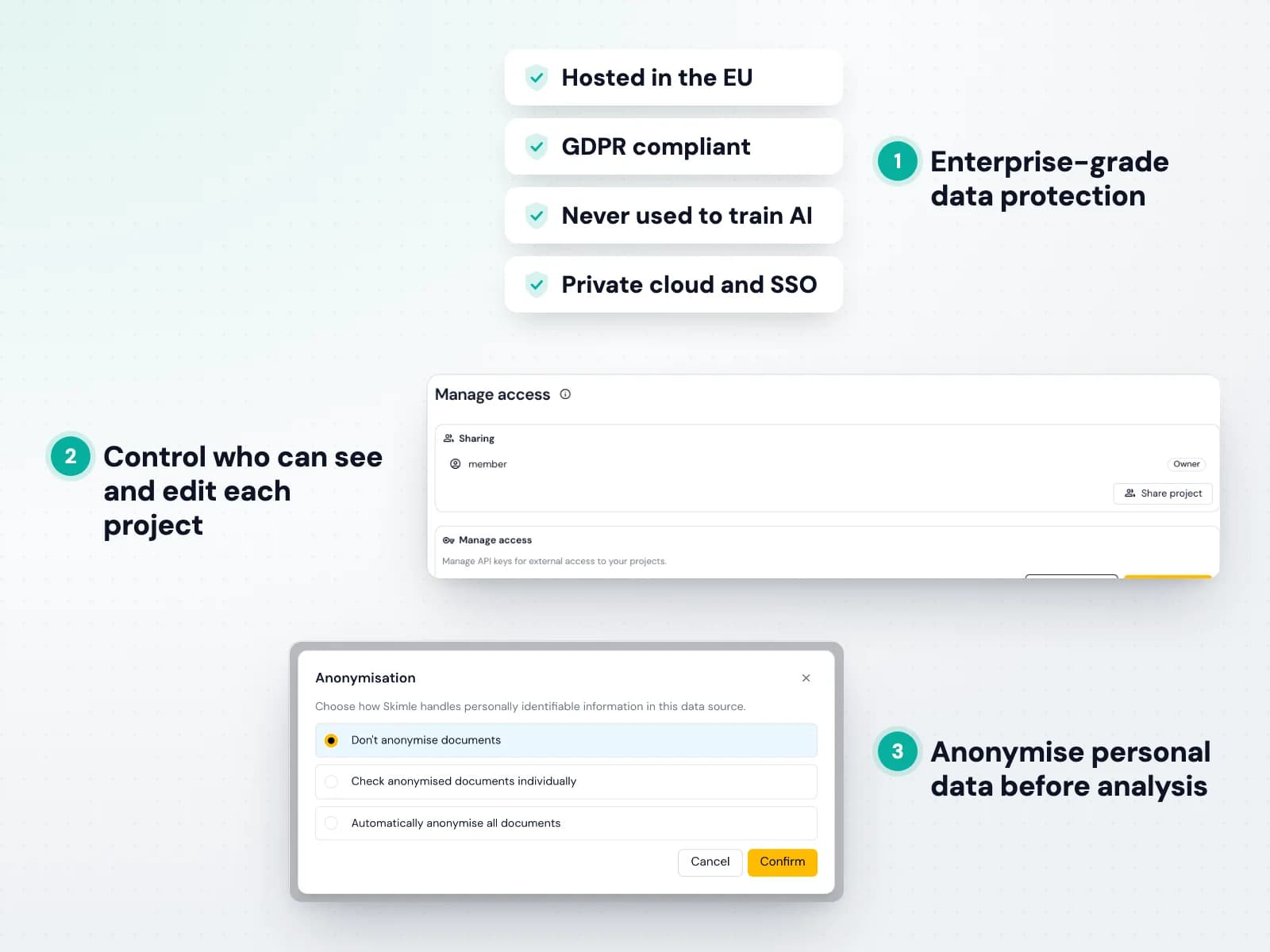
Skimle is built for sensitive research. All data is hosted in the EU, encrypted in transit and at rest, and never used to train AI models. Read our privacy policy.
You control who can see and edit each project, personal data can be anonymised before analysis, and a data processing agreement is available. Enterprise customers can choose private cloud deployment and single sign-on.
- EU hosting and GDPR compliance
- Never used to train AI models
- Private cloud and SSO for enterprises



Collaborate
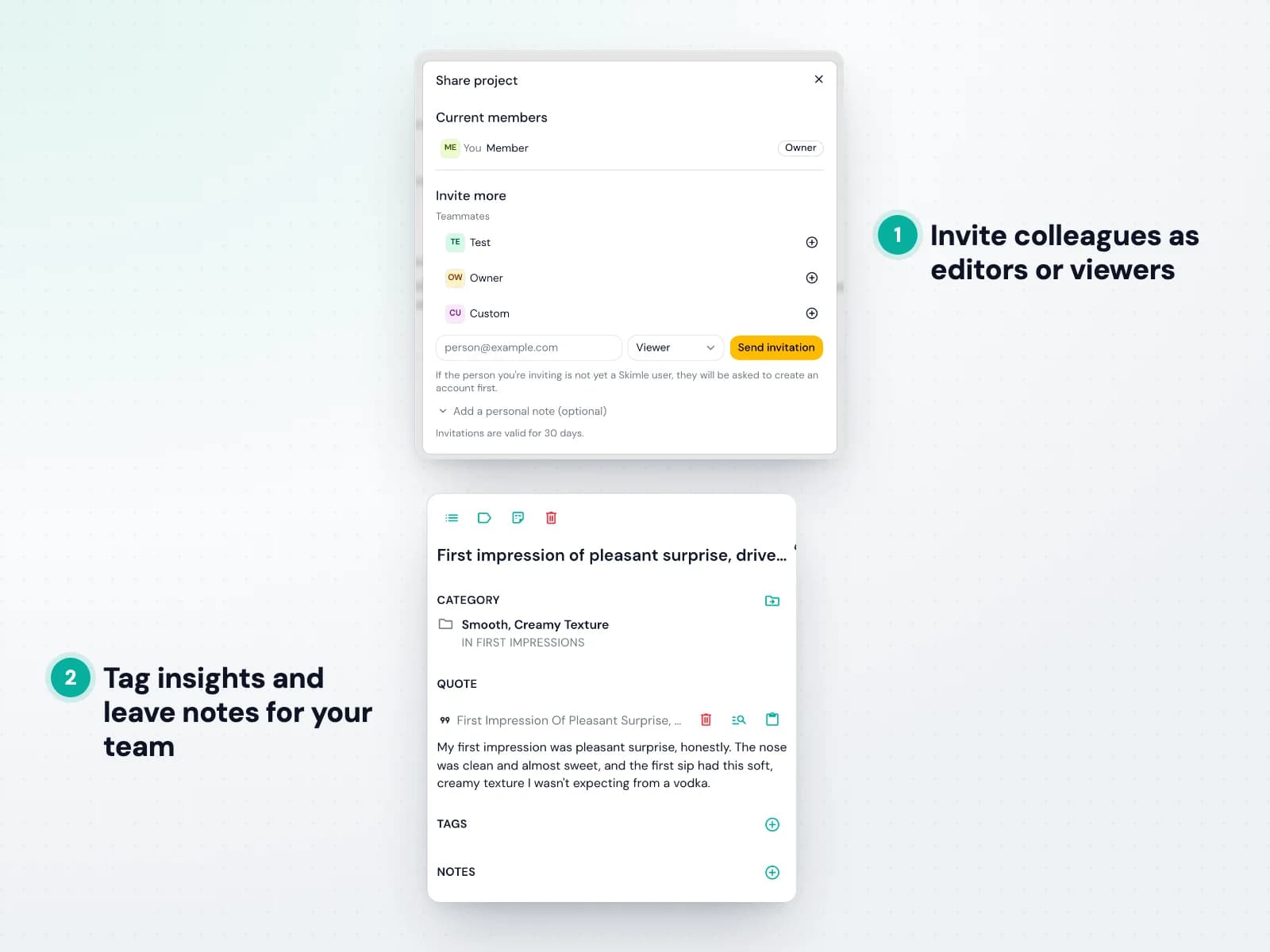
A Skimle project is a shared workspace. Invite colleagues as editors who can upload and edit, or as viewers who can explore everything without changing it. See how sharing works.
Coding decisions, tags and notes stay in one place, so a research team, a client or a supervisor always looks at the same, current analysis.
- Editor and viewer roles
- Tags and notes on insights
- One shared, current analysis



How does Skimle compare
Manual tools are rigorous but slow, generic AI is fast but cannot be checked, and vertical tools are built for one job at a premium price. Only Skimle combines a rigorous analytical engine, full transparency and versatility, from €20 per user per month.
| Manual tools NVivo, MAXQDA, ATLAS.ti… | Generic AI tools ChatGPT, Claude… | Vertical-specific tools CoLoop, Listen Labs… | Skimle | |
|---|---|---|---|---|
| Rigorous analytical engine |  | | | |
| Two-way transparency, summary to source | | | | |
| Versatile across data types and use cases | | | | |
| Fast | | | | |
| Easy to learn | | | | |
| Price | ~€80 per user per month | ~€20 per user per month | €400+ per month | Starting at €20 per month, free trial |
| Scale | Limited by manual coding effort | Limited context, unverifiable coverage | Varies by tool | Thousands of documents per project |
| GDPR and data security | Varies by deployment | Depends on plan and settings | Varies by vendor | Built-in · EU servers · DPA available |
| Verdict | Publication-quality rigour, but weeks of manual coding per project. | Fast, but answers vary by prompt and cannot be traced or defended. | Built for one workflow, often at enterprise prices. | Academic-grade rigour at AI speed, fully transparent, for any qualitative data. |
FAQ
Frequently asked questions
- What is Skimle?
- Skimle is an AI-powered qualitative data analysis platform that systematically structures unstructured documents — interviews, reports, consultations, customer feedback — into organised, analysable datasets with full traceability. Unlike chatbots, Skimle processes your entire document set upfront, extracting insights and organising them into hierarchical themes where every finding links to a verified verbatim quote.
- How is Skimle different from ChatGPT or RAG-based tools?
- RAG tools retrieve relevant passages at query time — so you get different answers each time you ask the same question. Skimle analyses your entire dataset systematically upfront, creating a stable structure where every theme links to verified quotes. You get comprehensive coverage, consistent results, and full traceability instead of black-box answers.
- How is Skimle different from NVivo, MAXQDA, or ATLAS.ti?
- Traditional tools require manual coding of every passage — systematic but time-intensive, taking weeks to months. Skimle automates the coding process with AI while maintaining the same systematic, transparent methodology. You get NVivo-quality rigour at a fraction of the time, with a more intuitive cloud-native interface that requires no weeks of training.
- Can I use Skimle for academic research?
- Yes. Skimle is built by academics and inspired by established methodologies: thematic analysis (Braun & Clarke), grounded theory (Glaser & Strauss; Strauss & Corbin), and the Gioia method (Gioia, Corley & Hamilton). Skimle's full audit trail lets you document exactly how themes were derived, which satisfies peer review requirements. Researchers at 30+ universities currently use Skimle, and we provide suggested citation language upon request.
- What languages and file formats does Skimle support?
- Skimle supports 100+ languages and accepts PDF, Word (.docx), RTF, TXT, CSV, audio (MP3, M4A, WAV) and video (MP4, MOV) files. You can mix formats and languages in a single project — upload English interviews, German reports, and Spanish survey responses together. Audio and video are transcribed automatically.
- Is Skimle GDPR compliant and secure?
- Yes. All data is stored in the European Union and never leaves EU servers. Skimle is fully GDPR compliant and provides Data Processing Agreements for institutional customers. Your documents are never used to train AI models. Single-tenant cloud deployments are available for enterprise clients with stricter data sovereignty requirements.
- How do you prevent AI hallucinations?
- Every insight Skimle generates is verified against source documents — if the AI produces text that does not exist verbatim in your data, the system flags it and re-processes. Two-way transparency lets you click any theme to see the exact supporting quotes, and open any document to see which text was coded and which was not, so nothing can be invented or missed.
- How quickly can I get my first results?
- Most projects take minutes to process. Larger datasets with 1000+ documents can take more time. A typical set of 10–20 interview transcripts is usually processed in under an hour. You can upload, start an analysis, and have structured themes with supporting quotes ready to explore the same day — no setup or training required.
- Do I need technical skills to use Skimle?
- No. Skimle is designed for qualitative researchers, analysts and consultants — not engineers. You upload your documents, describe your research question, and Skimle handles the rest. Editing categories, exploring themes, and exporting reports all work through a point-and-click interface. No coding, scripting, or AI expertise required.
- How does pricing work? Is there really a free trial?
- Yes — Skimle offers a free trial with 200 credits (enough for approximately 200–300 pages of documents) and no credit card required. Paid plans start at €20/month for individuals on annual billing (€25 month-to-month), with larger plans for heavy users. Organisational and enterprise plans with custom volumes, SSO, and single-tenant deployments are available on request.
- What's the maximum number of documents I can analyse?
- Skimle supports thousands of documents per project. This is well beyond what any manual approach could handle and covers most professional use cases — from 10 in-depth interviews to 1,000+ open-text survey responses. If you have a particularly large dataset or ongoing analysis needs, contact us to discuss options.
Built for professionals, by professionals
Skimle has over 1,500 happy users across 50+ universities, government entities, agencies and enterprises. All data is stored within the EU and processed according to our strict GDPR policy and terms of service.
Want to learn more? Explore our Signal & Noise blog, our FAQ, and use cases by sector. We're also happy to demo the product or explore how Skimle could fit your needs. Read more about the company behind Skimle